

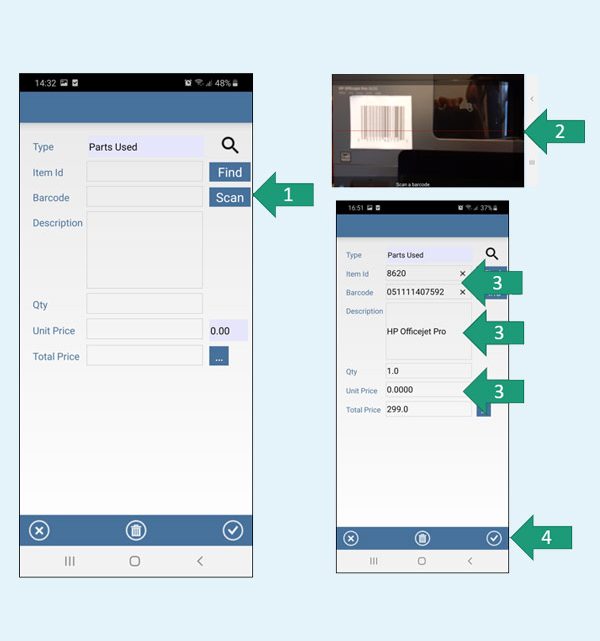
Creating a comprehensive digital inventory and maintenance log using part scanning apps
April 27, 2026You know that sinking feeling. You’re halfway through a repair, and the part you need is… somewhere. Maybe in the garage. Maybe in the shed. Maybe you bought it three years ago and it’s still in the box. Honestly, it’s a mess. But what if you could scan a barcode, snap a photo, and instantly know exactly where everything lives — and when it last got serviced? That’s the promise of part scanning apps. Let’s talk about building a real, working system.
Why your current “system” is probably failing you
Most of us rely on memory, sticky notes, or that one spreadsheet we update once a year. And it works — until it doesn’t. You lose a receipt, forget a filter change, or realize the spare belt you bought is the wrong size. The pain point? You’re losing time and money hunting for parts or re-ordering things you already own.
Here’s the deal: a digital inventory isn’t just for warehouses or factories. For homeowners, hobbyists, or small business owners, it’s a game-changer. Part scanning apps turn your phone into a database. They let you log items with photos, serial numbers, purchase dates, and maintenance schedules. And the best part? It takes seconds per item.
What exactly is a part scanning app?
Think of it as a barcode reader on steroids. You scan the UPC or QR code on a product box, and the app pulls up details — sometimes even manuals or warranty info. Then you add your own notes: “Installed on water heater, replaced every 6 months.” Some apps even let you set reminders. It’s like having a personal assistant for your stuff.
Sure, you could use a generic inventory app. But part-specific ones — like Sortly, PartKeepr, or even specialized barcode scanners — are built for this. They handle the quirks of hardware, like tracking multiple locations or logging serial numbers for warranties.
Step 1: Choosing the right tool for your chaos
Not all scanning apps are created equal. You need one that fits your specific mess. Here’s a quick breakdown:
| App / Tool | Best for | Key feature |
|---|---|---|
| Sortly | Home users, small workshops | Visual inventory with photos, barcode scanning, folders |
| PartKeepr | Electronics hobbyists, repair shops | Open-source, part parameters, supplier tracking |
| Asset Panda | Small businesses, field service | Custom fields, QR codes, maintenance logs |
| My Stock Inventory | General inventory management | Barcode scanning, low-stock alerts |
| Simple Barcode Scanner | Quick, no-frills scanning | Exports to CSV, lightweight |
I personally lean toward Sortly if you’re visual — you can snap a photo of the part right there. But if you’re into electronics, PartKeepr’s parametric search is a lifesaver. Test a couple. Most have free tiers.
Don’t forget the hardware
Your phone’s camera works fine. But if you’re scanning hundreds of items, consider a dedicated Bluetooth barcode scanner. They’re cheap (like $30) and speed things up. No more fumbling with autofocus.
Step 2: Building your digital inventory — the messy first pass
Alright, let’s dive in. Start small. Pick one area — say, your tool drawer or the spare parts bin. Don’t try to scan everything in one go. You’ll burn out.
Here’s a process that actually works:
- Gather everything in that area. Dump it on a table. Yes, it’ll look like a bomb went off.
- Scan the barcode using your app. If there’s no barcode (like a loose screw), take a photo and type a description.
- Add a location tag — “Garage, shelf 3, red bin.” Be specific. “Somewhere in the garage” is useless.
- Log the quantity and, if it’s a consumable, set a minimum stock alert.
- Note the purchase date and price — this helps later for warranty claims or budget tracking.
Honestly, the first 20 items will feel tedious. But once you see your digital shelf populate, it gets addictive. You’ll start scanning random things — “Oh, that lightbulb? Let me log it.”
A quick hack for serial numbers
Most apps let you scan serial numbers too. Do it for expensive items — power tools, appliances, electronics. If something breaks, you have the serial number handy for the manufacturer. No more crawling behind the fridge to read a faded sticker.
Step 3: Turning your inventory into a maintenance log
Here’s where it gets really useful. A digital inventory is cool. But a maintenance log? That’s the gold. You can track when you last changed the oil in your lawnmower, when the HVAC filter was replaced, or when you sharpened your chisels.
Most part scanning apps have a notes field or a custom date field. Use it. Create a simple system:
- Date of last maintenance
- Next due date (set a reminder in your phone’s calendar)
- What was done — “Replaced spark plug, cleaned air filter”
- Parts used — link to the inventory item if possible
For example, I log my car’s oil changes. I scan the oil filter box, note the mileage, and set a 5,000-mile reminder. When the reminder pops, I check the app, see the last filter I bought, and grab it. No more “Did I use synthetic last time?”
Maintenance templates — your secret weapon
Some apps (like Asset Panda) let you create templates. So for every power tool, you can pre-fill fields like “Check carbon brushes every 50 hours” or “Lube gears annually.” It’s a bit of upfront work, but it saves you from forgetting critical checks.
If your app doesn’t have templates, just copy-paste a standard note into each item. It’s clunky, but it works.
Step 4: Organizing your digital chaos with labels and folders
Once you’ve got 50+ items, you need structure. Think of it like your phone’s photo album — you don’t just dump everything in one folder.
Create categories that make sense to you:
- By location: “Kitchen,” “Workshop,” “Garage,” “Basement”
- By type: “Fasteners,” “Electrical,” “Plumbing,” “Power tools”
- By project: “Boat restoration,” “Garden irrigation,” “Home theater”
Here’s a trick: use tags or labels. Most apps let you add multiple tags to one item. So a screwdriver could be tagged “Workshop,” “Hand tools,” and “Project A.” That way, you can search by any angle.
And don’t overthink it. You can always reorganize later. The goal is to find things fast, not to build a perfect taxonomy.
Step 5: Keeping it alive — the habit loop
The biggest risk? You build this beautiful inventory, then forget to update it. A part gets used, but you don’t remove it from the app. Suddenly, your digital inventory is as unreliable as your memory.
Create a simple habit:
- When you use a part, scan it out. Most apps have a “consume” or “reduce quantity” button.
- When you buy a new part, scan it in immediately. Before you even put it on the shelf.
- Once a month, do a quick audit. Pick a drawer, check the app, fix any discrepancies.
It sounds like work, but honestly, it takes less time than hunting for a lost bolt for 20 minutes. And the peace of mind? Priceless.
What about sharing the log?
If you’re in a household or a small team, share the app. Sortly and Asset Panda allow multi-user access. Now your partner or employee can check if we have a specific drill bit without calling you. No more “Honey, where’s the 10mm socket?” — it’s in the app.
Real-world example: From junk drawer to Jedi-level organization
Let me walk you through a quick scenario. I helped a friend set this up for his woodworking shop. He had three shelves of random hardware — screws, brackets, hinges — all in unlabeled jars. He spent 15 minutes per project just finding parts.
We used Sortly. Scanned every barcode. Took photos of loose items. Added location tags like “Shelf 2, left side, blue jar.” Then we set maintenance reminders for his table saw (blade change every 3 months) and dust collector (filter clean every 6 months).
After a month, he said he saved about 2 hours per week. That’s 8 hours a month — basically a full workday. And he never bought a duplicate part again. The key? He stuck with the habit of scanning in new purchases.
Common pitfalls — and how to avoid them
Look, it’s not all smooth sailing. Here are a few things that trip people up:
- Over-scanned items: You don’t need to log every single screw. Focus on parts that cost money or are hard to replace.
- Too many locations: Keep it simple. “Garage” is fine. “Garage, north wall, third pegboard